Control change messages
Control Change Messages
Control Changes are a special type of output Message which is a more rigorous fault tolerant process to write any data to an Asset.
Note
It also has failure protocols should it be impossible to write to the Asset, for example if it is offline.
To learn more about control changes and the detailed workflow, check out the full documentation in the overview concepts here.
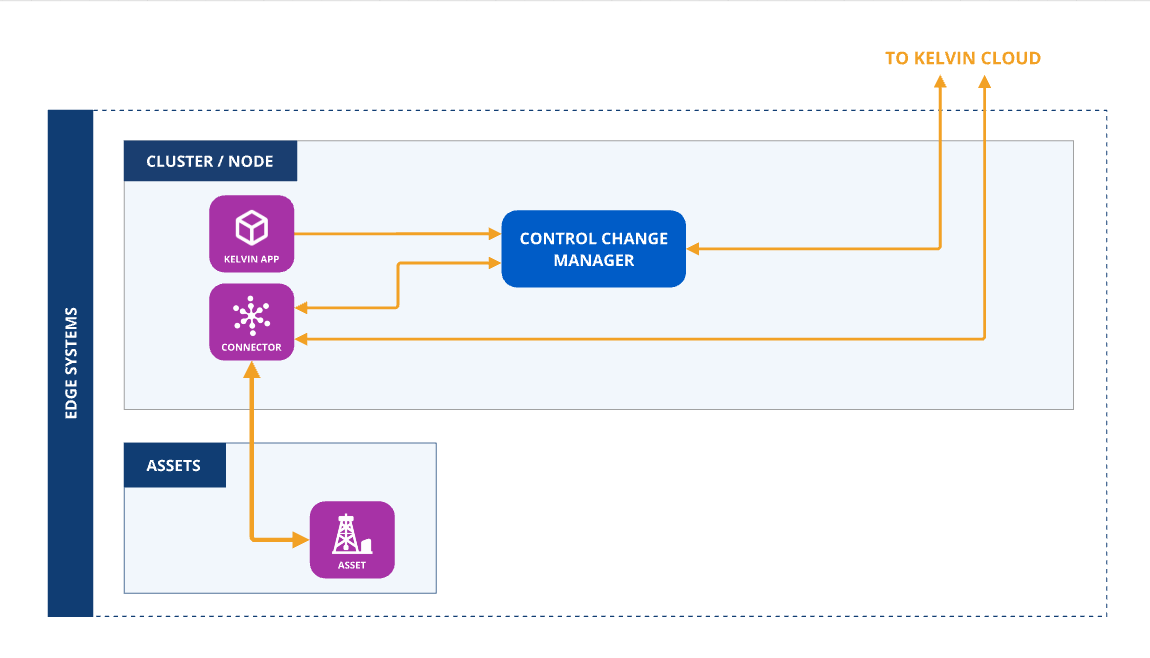
To ensure the output is treated as a control change:
Warning
You do not put a Control Change output definitions under the data_streams/outputs key.
The Control Change Object supports the following attributes :
| Attribute | Required | Default Value | Description |
|---|---|---|---|
resource |
required | N/A | The KRNAssetDatastream that this Control Change is meant for. |
expiration_date |
required | N/A | Absolute datetime or a timedelta (from now) when the Control Change will expire. |
payload |
required | N/A | The desired target value for the control change (Boolean, Integer, Float or String). |
retries |
optional | 0 | Number of additional write requests sent to the Connection after the initial write. Retrying stops when an Applied confirmation is received or when the Asset returns an explicit failure (relayed by the Connection). Exhausting retries does not fail or expire the Control Change. |
timeout |
optional | 300s | Interval in seconds between write requests to the Connection (retry interval). |
control_change_id |
optional | Random UUID | Sets a user specific ID for the control change (UUID). |
from_value |
optional | Initial (trigger) value of the control change. |
Offline Edge Operations
Control Changes can operate even if the edge device does not have any Internet connection.
The only stipulation is that the Application that produces the control change object and the Application or Connector that consumes the control change object are hosted on the same Cluster and have local communications if they are hosted on different Nodes.
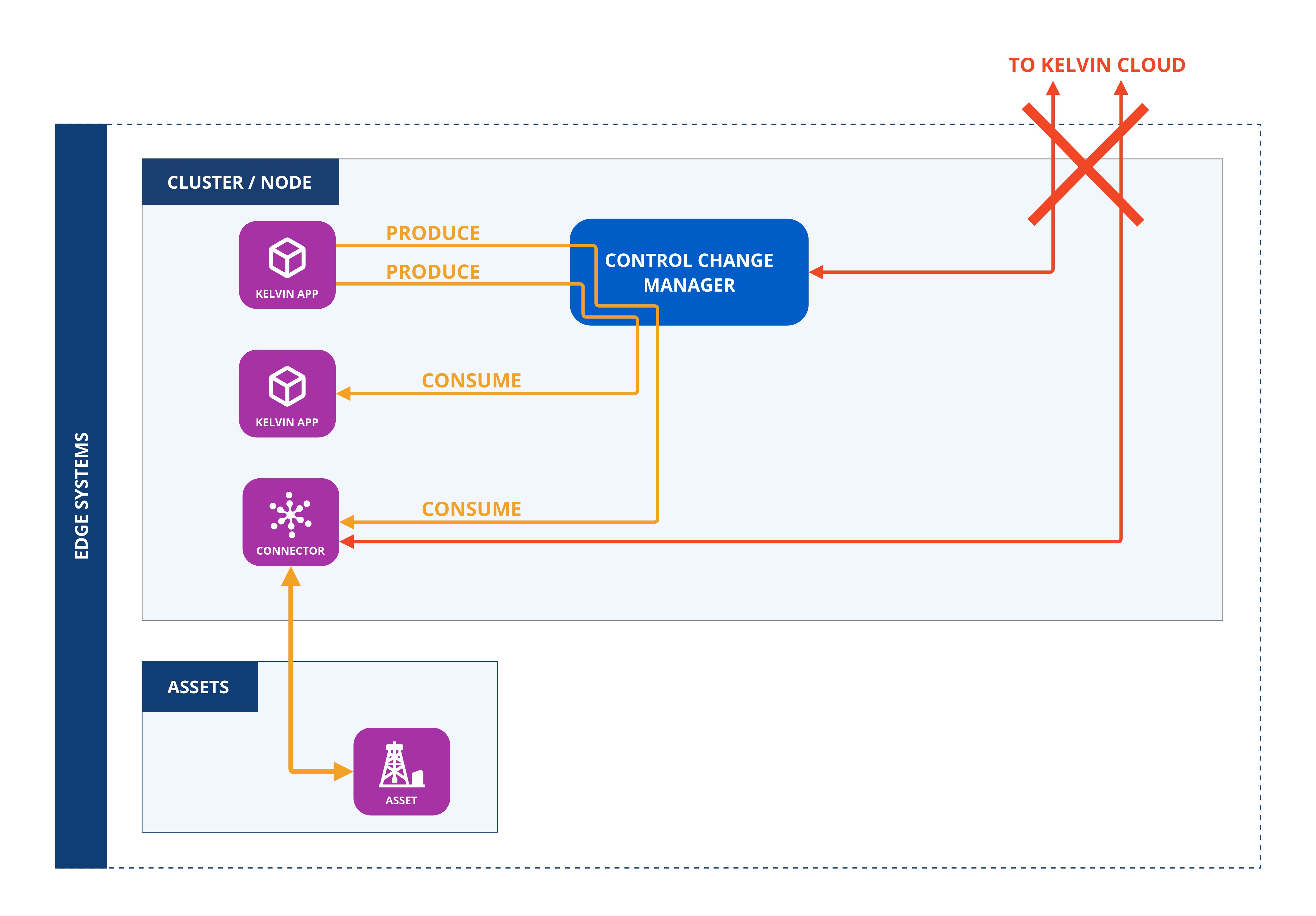
To set this up, the app.yaml file of the Application that produces the control change object must define the output Data Stream with the control_change key.
If the consumer is a Connector, then this key is automatically set using the Kelvin Connector setup process.
The Application or Connector will now automatically receive the control change object directly from the Application without requiring any connection to the Kelvin Cloud.
Examples
Here is a minimal Control Change.
In many cases you want to show what the current value is when the control change request is initiated.
This allows users to make informed decisions when the Control Change is embedded in a Recommendation or for Data Scientists when reviewing their model's historical performance.
Note
This code assumes the last_value variable is declared somewhere else.
In some cases you may want a cool-off period between retry attempts, or to limit the number of retries. After the last retry, the Control Change remains pending until the expiration_date is reached.
Note
Exhausting retries does not abort the Control Change early.
Retries control how many additional write requests the Control Change Manager sends to the Connection after the initial write. The Connection writes to the Asset on each attempt. Retrying stops when an Applied confirmation is received or when the Asset returns an explicit failure (relayed by the Connection). If all retries are exhausted without Applied, the Control Change Manager stops sending write requests but the Control Change remains pending until expiration_date.
If the "Applied" status is not received from the Connection to the Control Change Manager by the expiration_date, the process is deemed unsuccessful.
No more attempts will be made to apply the new value to the Asset.
In this example the expiration date is made ten minutes from the time the control change is created.
The timeout (retry interval) parameter sets the interval in seconds between write requests to the Connection. The Control Change Manager waits this long after each write request before sending the next retry.
In this example timeout (retry interval) is set to 60 seconds.