App Registry
The App Registry is the central store for all programs developed on the Kelvin Platform. Think of it like an app store for industrial automation: developers upload their programs here, and from the App Registry those programs can be deployed to any connected edge location without any additional infrastructure work.
Every program in the App Registry sits ready to deploy, but is not yet running. Once deployed to a Cluster, a program becomes a Workload.
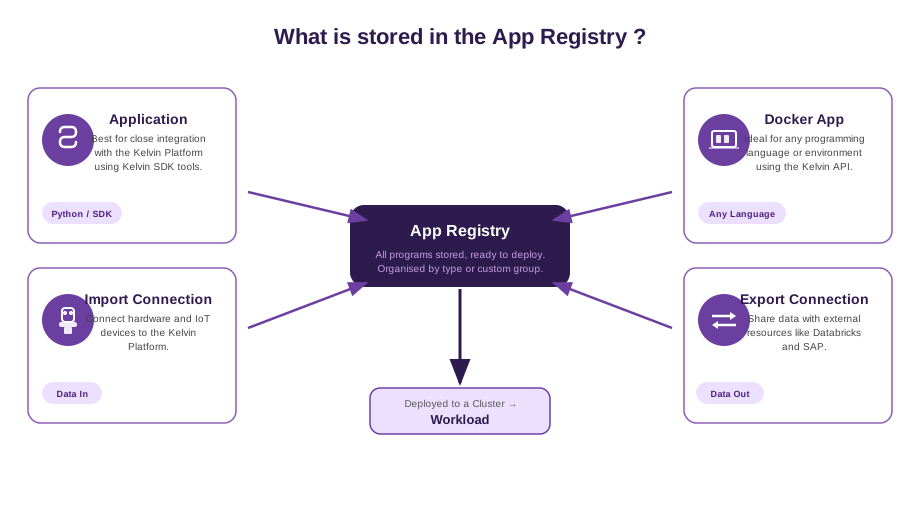
What is stored in the App Registry
The App Registry holds four types of programs:
-
Application — A Python program built with the Kelvin SDK. It has tight integration with the Kelvin Platform and is the most common program type. Operations Engineers can assign assets, tune parameters, and monitor output directly from the Kelvin UI without touching any code.
-
Docker App — A containerised program for teams that need a different programming language or environment. It connects to the Kelvin Platform through the Kelvin API rather than the SDK.
-
Import Connection — A program that pulls data into Kelvin from external sources: OPC UA, Modbus, ROC, CSV feeds, or custom industrial protocols.
-
Export Connection — A program that pushes data out of Kelvin to external systems such as Databricks, SAP, or other data platforms.
From App Registry to Workload
The App Registry is a storage and distribution layer, not a runtime. A program stored in the registry is idle. It becomes active only when deployed:
| Stage | What it is |
|---|---|
| App Registry | Program stored, versioned, and ready to deploy |
| Workload | Program deployed and running on a Cluster at the edge |
Operations Engineers and Platform Administrators select a program from the App Registry, choose a target Cluster, and assign assets. The Kelvin Platform handles the rest of the deployment automatically.
Viewing the App Registry
The full list of programs in the App Registry is visible in the Applications section of the Kelvin UI. Programs are grouped by type or by a custom group name set by the Developer or Platform Administrator.