Test Harness & Setup
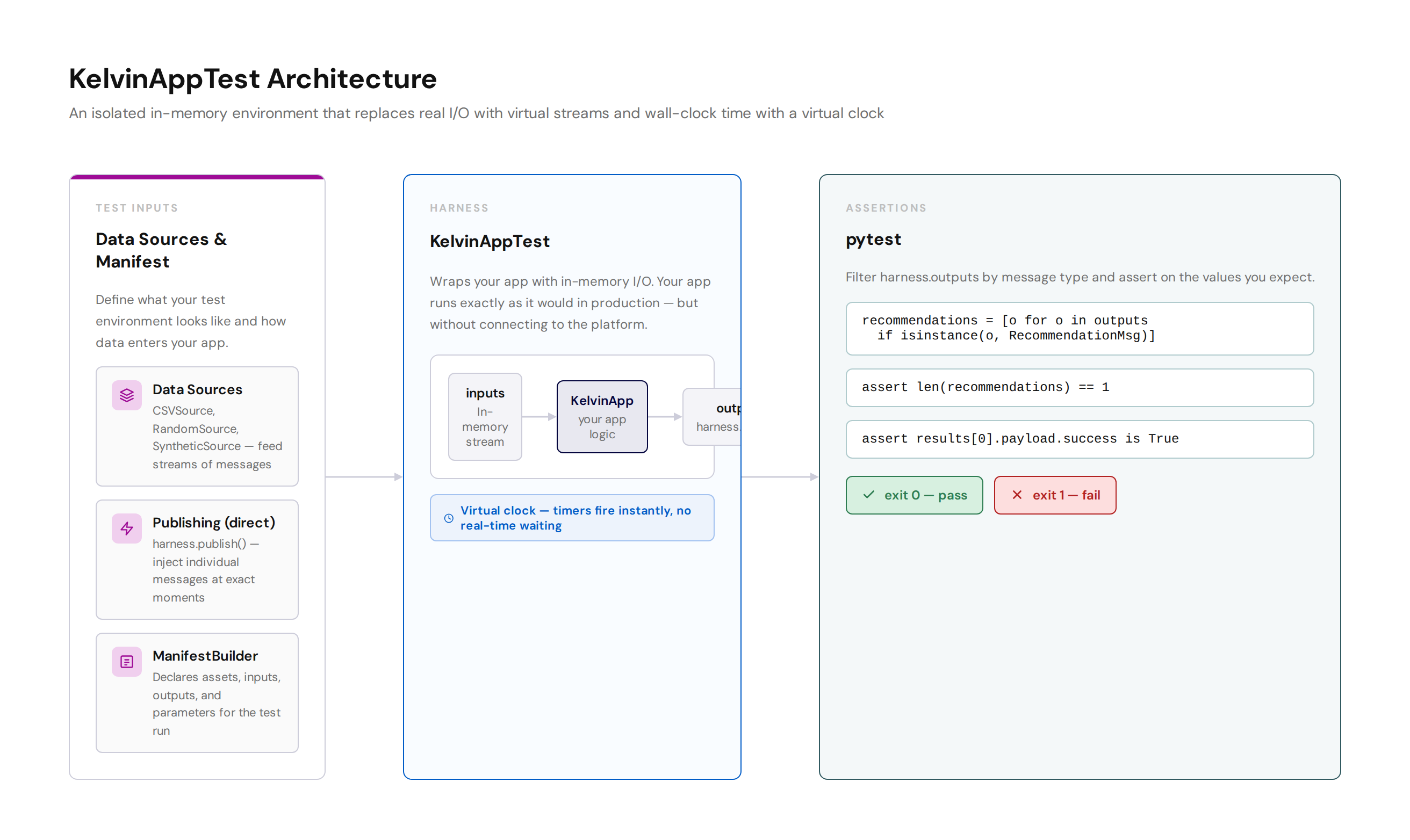
KelvinAppTest is a testing harness built into the Kelvin SDK. It wraps your KelvinApp instance in an isolated in-memory environment so you can inject data, run your app logic, and inspect every message your app produces — all inside a pytest test function.
Your app runs exactly as it would in production, but without connecting to the Kelvin platform. There are no terminals to manage, no network calls, and no real-time waiting.
Why use automated testing
| Challenge | How KelvinAppTest solves it |
|---|---|
| A 60-second timer means waiting 60 real seconds | Virtual clock — run_until_idle(timeout=61.0) fires the timer instantly |
| Outputs can only be checked by reading logs | harness.outputs is a plain Python list you can filter and assert on |
| Results vary between runs | Deterministic — same inputs always produce same outputs |
| CI cannot fail on broken app logic | Standard pytest exit codes — exit 0 = pass, non-zero = fail |
What you need
Install pytest and the asyncio plugin:
Your main.py must expose your KelvinApp instance as a module-level variable. Apps created with kelvin app create do this by default:
The test file imports app directly from main.py so the harness can wrap it.
ManifestBuilder
ManifestBuilder defines what your test environment looks like. It tells the harness which inputs and outputs exist, which assets are available, and what their parameters are. Build it once and reuse it across tests.
Programmatic setup
from kelvin.testing import ManifestBuilder

manifest = (
    ManifestBuilder()
    .add_input("temperature")                                     # input data stream name
    .add_input("pressure")
    .add_output("alert")                                          # output data stream name
    .add_control_change_input("setpoint")                         # control change input
    .add_control_change_output("setpoint-ack")                    # control change output
    .add_custom_action_input("start-pump")                        # custom action type
    .add_custom_action_output("start-pump-result")
    .add_asset("doc_demo_plunger_01", parameters={"limit": 75})   # asset with parameters
    .add_asset("doc_demo_plunger_02", parameters={"limit": 75})
    .set_configuration({"mode": "auto", "threshold": 80})         # app-level configuration
    .build()
)
Load from app.yaml
If your app.yaml already declares all inputs and outputs, you can load them directly:
from pathlib import Path
from kelvin.testing import ManifestBuilder

manifest = (
    ManifestBuilder.from_app_yaml(Path("app.yaml"))
    .add_asset("doc_demo_plunger_01", parameters={"limit": 75})
    .add_asset("doc_demo_plunger_02", parameters={"limit": 75})
    .build()
)
Complete method reference
| Method | Description |
|---|---|
ManifestBuilder.from_app_yaml(path) |
Load inputs, outputs, and control changes from app.yaml. Add assets separately. |
.add_asset(name, parameters={}) |
Add an asset. Pass a parameters dict for any asset-level parameters your app reads. |
.add_input(name, data_type=None, unit=None) |
Add an input data stream. data_type and unit are optional. |
.add_output(name, data_type=None, unit=None) |
Add an output data stream. |
.add_control_change_input(name) |
Add a control change input channel. |
.add_control_change_output(name) |
Add a control change output channel. |
.add_custom_action_input(type) |
Add a custom action input by action type name. |
.add_custom_action_output(type) |
Add a custom action output channel. |
.set_configuration(config) |
Set the app-level configuration dict your app reads via app.app_configuration. |
.build() |
Build and return the RuntimeManifest. Call this last. |
KelvinAppTest
Once you have a manifest, create the harness and run your test inside an async with block:
import pytest
from main import app
from kelvin.testing import KelvinAppTest, ManifestBuilder
from kelvin.message import RecommendationMsg

@pytest.mark.asyncio
async def test_threshold_alert():
    manifest = (
        ManifestBuilder()
        .add_input("temperature")
        .add_asset("doc_demo_plunger_01", parameters={"limit": 75})
        .build()
    )

    harness = KelvinAppTest(app, manifest=manifest)

    async with harness:
        await harness.publish(
            Number(resource=KRNAssetDataStream("doc_demo_plunger_01", "temperature"), payload=85.0)
        )
        await harness.run_until_idle()
        outputs = harness.outputs

    recommendations = [o for o in outputs if isinstance(o, RecommendationMsg)]
    assert len(recommendations) == 1
Complete API reference
| Method or property | Description |
|---|---|
KelvinAppTest(app, manifest) |
Create the harness. Pass your KelvinApp instance and the built manifest. |
.add_source(source) |
Attach a data source (CSVSource, RandomSource, SyntheticSource). Call before the async with block. |
async with harness: |
Start the harness. Your app connects and is ready to receive messages inside this block. |
await harness.publish(msg) |
Inject a single message into your app. |
await harness.publish_batch(messages) |
Inject a list of messages at once. |
await harness.run_until_idle(timeout=5.0) |
Process all pending messages and tasks, then return. Set timeout to just past your longest timer interval. |
await harness.advance_time(seconds) |
Jump the virtual clock forward by the given number of seconds and fire any timers that fall within that window. |
harness.outputs |
A plain Python list of every message your app published during the test. |
harness.inputs |
A plain Python list of every message injected into your app. |
harness.clock |
The VirtualClock instance. Use harness.clock.now() to read the current virtual time. |
harness.is_connected |
True if the harness is currently running inside an async with block. |
Virtual time
If your app uses a timer — @app.timer(interval=300) for example — you would normally wait 5 real minutes for it to fire. With KelvinAppTest you do not wait at all.
Call run_until_idle with a timeout just past your timer interval. The harness advances the virtual clock to that point instantly and fires the timer:
async with harness:
    await harness.run_until_idle(timeout=301.0)  # jumps 300 virtual seconds, fires the timer
    outputs = harness.outputs
For finer control, use advance_time to move the clock to a specific point, then call run_until_idle to process everything that fired:
async with harness:
    await harness.advance_time(seconds=300)
    await harness.run_until_idle()
    outputs = harness.outputs
Running tests and CI integration
Run all tests from your app folder:
pytest exits with code 0 if all assertions pass, or non-zero if any test fails. CI pipelines use this exit code to gate deployments. If the test fails, the deployment does not proceed.
To see detailed output for each test: