Kelvin MCP
On this page you will learn what Kelvin MCP is, who it is for, and how it fits into the Kelvin Platform.
What is Kelvin MCP?
Kelvin MCP is a way to talk to your Kelvin platform using plain, everyday language. Instead of navigating screens or running reports, you simply ask a question in a chat tool you already use, and get a direct answer about what is happening on your platform.
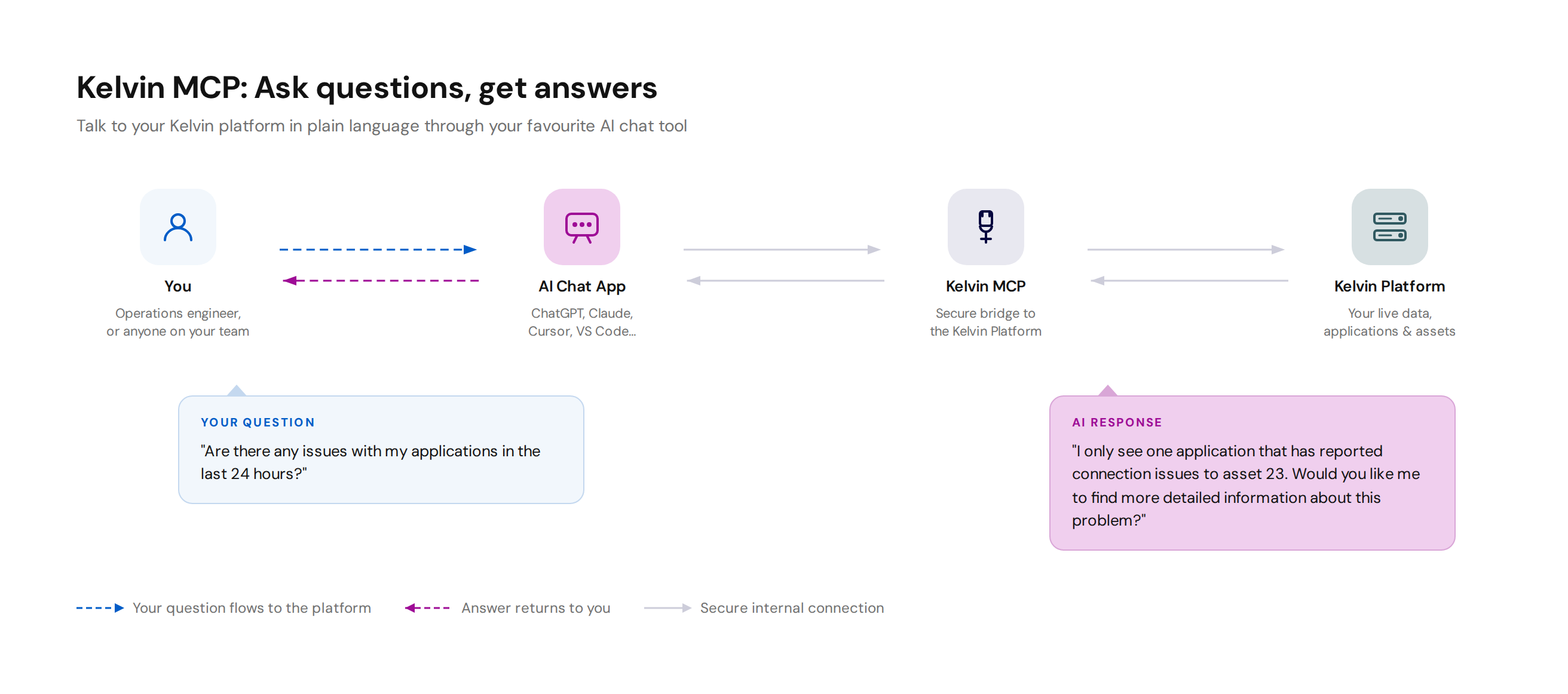
You can use it through familiar AI chat applications such as ChatGPT, Claude, or Cursor. Ask things like "Are there any issues with my applications in the last 24 hours?" and the AI will check your live Kelvin data and reply in plain language, the same way you would expect a knowledgeable colleague to answer.
No technical knowledge is needed. You do not need to understand how the platform works under the hood. You just ask, and you get an answer.
What you can do with it
Kelvin MCP lets you have a conversation with your platform. You can ask about the current state of your assets, check whether applications are running as expected, review recent recommendations, or ask for a summary of activity over the last day or week.
Because the AI understands natural language, you can phrase questions however feels natural to you. The AI figures out what information is needed, retrieves it from Kelvin, and presents it back to you in a way that is easy to understand.
This means you can stay informed and make faster decisions without waiting for a report or asking a colleague to look something up for you.
How it works
Kelvin MCP is a server that sits between your AI chat application and the Kelvin Platform. When you ask a question, the AI chat application sends a request to the Kelvin MCP server, which retrieves the relevant information from Kelvin and returns it. The AI then uses that information to compose the answer you see.
The server reads the Kelvin API's OpenAPI specification on startup and turns each operation into an MCP tool automatically. The tool catalog mirrors the full Kelvin API surface and is regenerated from the spec rather than maintained by hand. This means every capability available through the Kelvin API is immediately available to any connected AI tool.
Authentication
The Kelvin MCP server uses the same sign-in system as the rest of the Kelvin Platform. Connecting an AI client opens a browser sign-in flow automatically. No manual token handling is needed.
Note
The MCP server grants no new permissions. It uses your existing account and the Kelvin Platform enforces your existing permissions. The AI assistant can only access what you can access.
Developer documentation
For setup and technical reference, see the Kelvin MCP developer documentation.