Control Changes
Control Change Data Messages
When control changes are initiated by any Application on the Kelvin Platform, they can be processed by any Application.
Stream Decorators (Preferred)
The preferred and simplest method for consuming incoming control change messages is to create a Stream Decorator function and add a filter for Control Changes.
Note
You can filter by assets or datastreams to react only to specific incoming messages.
| Stream Decorators for Control Changes | |
|---|---|
Callbacks
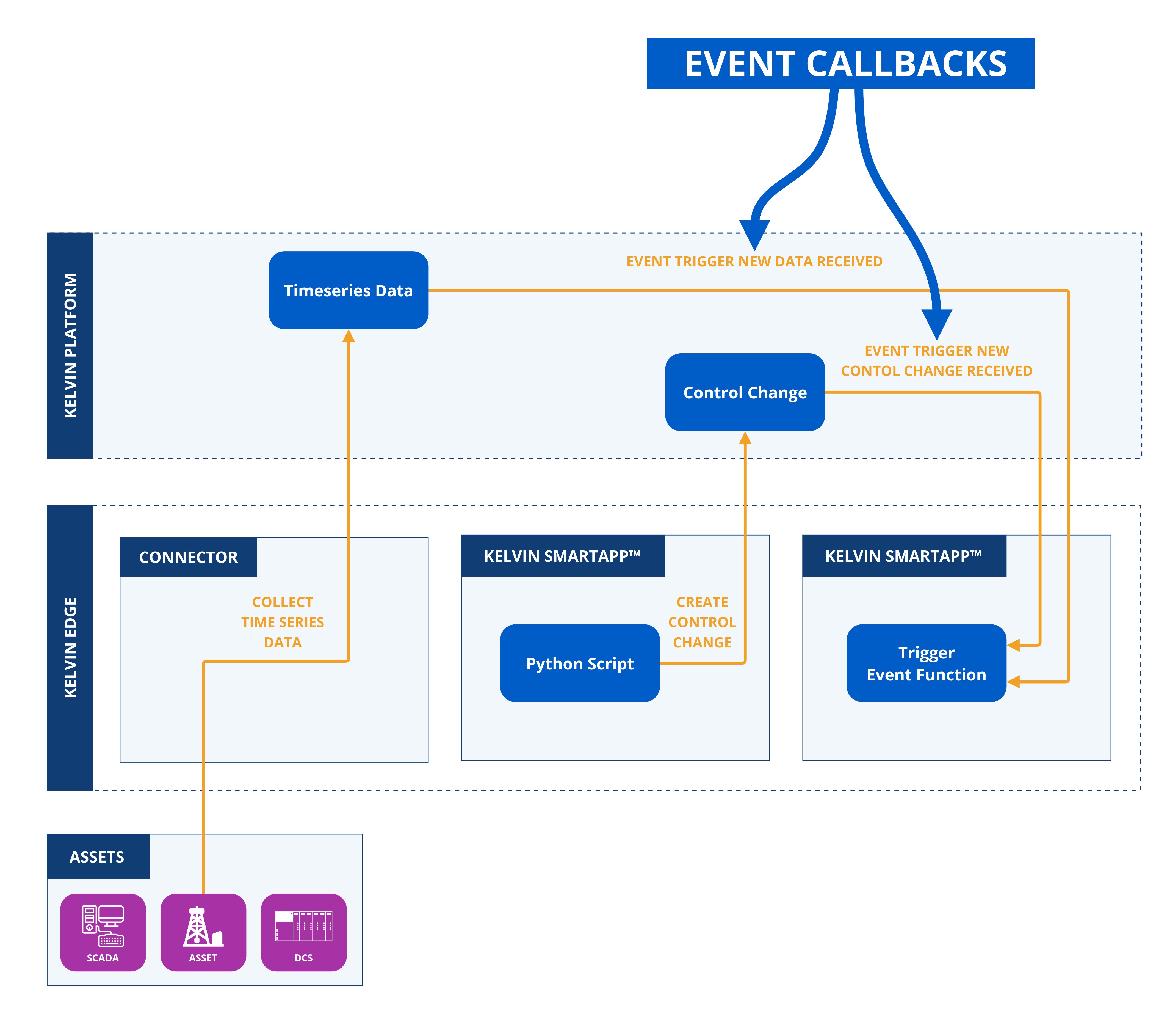
Event Callbacks are functions that are triggered when a control change is initiated.
Video Tutorial
You can watch this Event Callback video tutorial which will show you how to program and test it on you local machine with the Kelvin test data generator Python script.
Copy the code in the Video Tutorial
In the following chapters after the video tutorial you can see and copy all the scripts shown in the video tutorial.
Control Change Data Event
When any new control change is initiated, a callback event is created.
Detailed Explanation of Parameters
Response Parameters
-
id: UUID('db18aaaf-9a70-4c3e-babb-b7571867871f')
- Description: A unique random generated UUID as the key
idfor the control change object.
- Description: A unique random generated UUID as the key
-
type: KMessageTypeData('data', 'pt=number')
- Options:
number,boolean,string - Description: The format of the data to expect.
- Options:
-
trace_id: UUID('db18aaaf-9a70-4c3e-babb-b7571867871f')
-
timestamp: datetime.datetime(2024, 10, 28, 11, 51, 44, 601689, tzinfo=datetime.timezone(datetime.timedelta(seconds=25200), '+07'))
- Description: The time of recording of the time series data in the local computer's timezone.
-
resource: KRNAssetDataStream(asset='test-asset-1', data_stream='sa-rw-number')
- Description: The Asset and Data Stream names associated with the control change.
-
payload: The actual value in the declared
typekey format.
The full code is given here for the main.py script.
Detailed Code Explanations
Click on the for details about the code
- The
KelvinAppclass is used to initlize and connect the Application to the Kelvin Platform. - The
AssetDataMessageis a class representing the structure and properties of the asset data messages which will be held in an instance calledmsg. - The
on_control_changecallback function is triggered automatically whenever a new control change object is initiated to an Asset associated with the Application. It serves as an event handler to process incoming control change data in real time, ensuring that relevant review, actions or data updates occur immediately upon receipt.
When you run this Python script, the following output will be view in the terminal or logs;
App to App
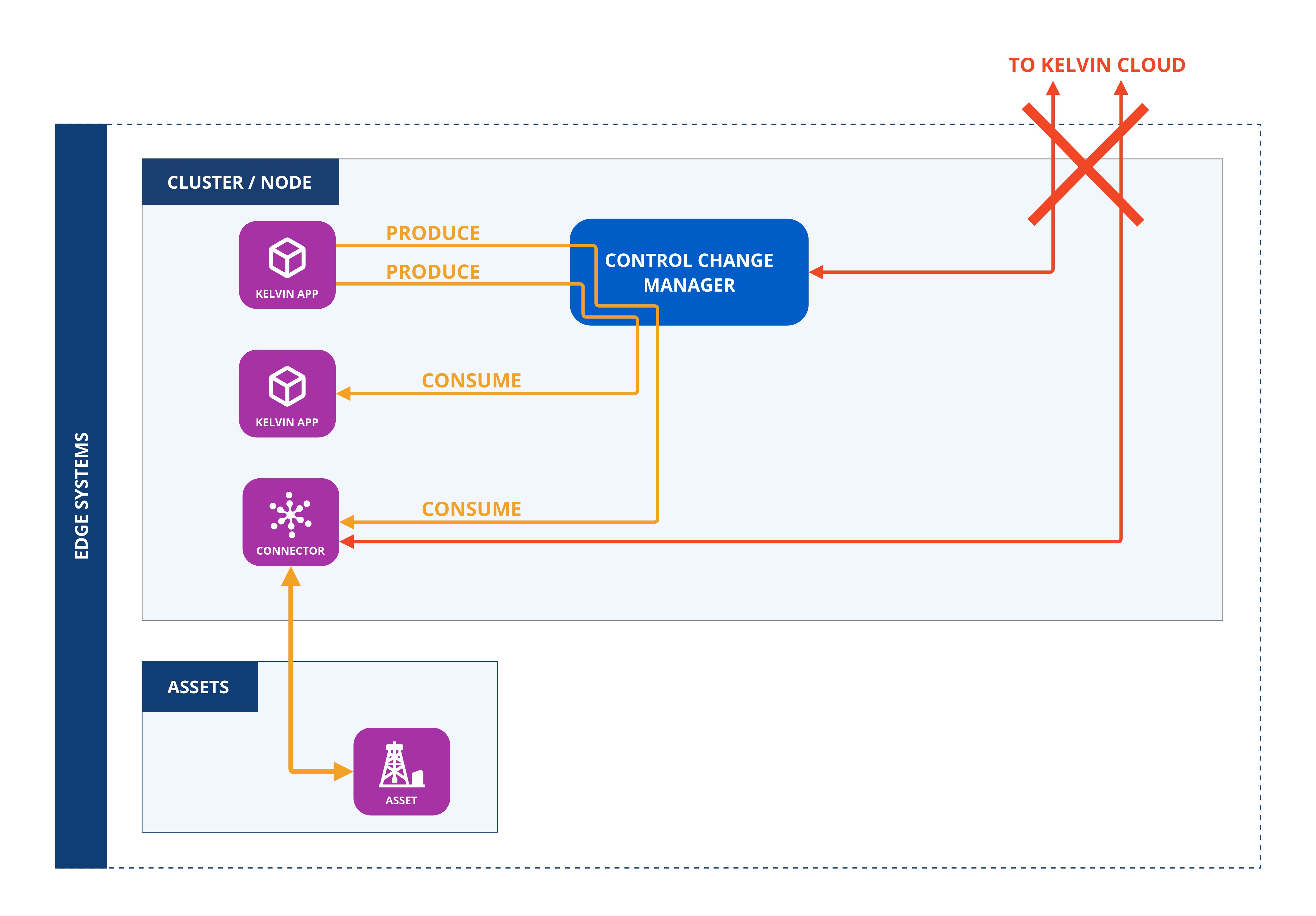
Control Changes can be sent from one Kelvin Application to another.
This can also operate even if the edge device does not have any Internet connection.
The only stipulation is that the Application that produces the control change object and the Application or Connector that consumes the control change object are hosted on the same Cluster and have local communications if they are hosted on different Nodes.
Producing App
To set this up, the app.yaml file of the Application that produces the control change object must be defined under the control_change key.
Then you can produce a Control Change to be sent to another Application.
This is a simple Control Change example.
Read the Control Change Produce page to see all the types of Control Changes you are produce.
Consuming App
and the Application that consumes the control change object must define the input Data Stream with the control_change key.
Then you can consume a Control Change that has been sent by another Application.
| Consume Control Change Python Example | |
|---|---|
You can also see the control change status with this code;
| Control Change Event Python Example | |
|---|---|
Note
Status vocabulary for consumers: "Processed" means the Connection received the write request from the Control Change Manager, sent the write to the Asset, and reported back to the CCM. It does not confirm the write was accepted by the Asset. "Applied" means the Connection's independent reads detected the Asset value now matches the requested value — the Connection reports this to the CCM, which stops all further write requests, timers, and the expiration countdown immediately. If the Asset returns an explicit failure, the Connection relays it to the CCM, which immediately ends the Control Change as Failed without waiting for the expiration_date.
For the full Control Change state model, see the Control Change concepts page.
If the consumer is a Connector, then this key is automatically set using the Kelvin Connector setup process. It will automatically receive the control change object directly from the Application without requiring any connection to the Kelvin Cloud.
Data Generator for Local Application Testing
Easily test your Application locally on your computer.
Comprehensive documentation is available for the Generator Tool. Click here to learn how to use this event callback script with the Test Generator on the "Test an Application" ⟹ "Generator" page.